

Small businesses are under pressure to do more with fewer people, smaller budgets, and tighter deadlines. A business owner may need to answer customers, prepare invoices, create social media content, write emails, update the website, check reports, and follow up with leads in the same day. This is where artificial intelligence tools can help. The right AI tool can reduce repetitive work, improve communication, speed up content creation, and make everyday decisions easier.
However, choosing an AI tool is not only about picking the most popular software. A good tool for one business may be unnecessary for another. A local service business may need faster replies and better appointment follow-ups. An online store may need product descriptions, email campaigns, customer support summaries, and sales reports. A small agency may need design, proposal writing, project management, and automation. The best AI tool is the one that solves a clear business problem without creating extra complexity.
This guide explains the best AI tools for small businesses in 2026, how each tool can be used, and what to check before paying for any subscription. The goal is to help business owners make practical decisions, not to promote one tool as perfect for everyone. Features, pricing, limits, and availability can change, so always check the official product page before purchasing.
Why Small Businesses Should Use AI Tools
AI tools are useful because they can help with tasks that normally consume hours every week. They can summarize long documents, draft emails, create first versions of social posts, organize notes, generate ideas, analyze basic data, and connect apps through automation. For a small business, saving even one or two hours per day can make a major difference because the same person often handles sales, support, marketing, and operations.
The biggest benefit is not replacing people. The real benefit is helping people work faster and more consistently. For example, a salon can use AI to draft weekly promotional posts. A dentist can use AI to explain treatment information in simple words. A freelancer can use AI to prepare proposals. A clothing store can use AI to rewrite product descriptions, prepare email campaigns, and organize customer questions. In each case, the business owner still needs to review the output and make final decisions.
AI is also becoming part of existing business software. Instead of using only separate chatbot tools, many companies now add AI inside email, documents, CRM systems, accounting tools, website platforms, and design apps. This makes AI easier for small teams because they do not need to learn a completely new system for every task.
How to Choose the Right AI Tool for Your Small Business
Before selecting any AI tool, ask these practical questions:
- What exact problem do I want to solve: writing, design, customer service, sales, finance, SEO, or automation?
- Does the tool connect with the software I already use, such as Gmail, Microsoft 365, Google Workspace, Shopify, WordPress, QuickBooks, or HubSpot?
- Can my team learn it quickly, or will it require too much training?
- Does the tool protect sensitive business and customer data?
- Can I start with a free trial or monthly plan before committing a long-term subscription?
- Will the tool save enough time or improve enough work quality to justify the cost?
- Can I review, edit, and approve the final output before customers see it?
A good rule is to start with one or two tools only. Many small businesses make the mistake of subscribing to too many platforms at once. It is better to test one AI writing or productivity tool, one design or marketing tool, and one automation tool after you understand your workflow.
Comparison Table: Best AI Tools for Small Businesses in 2026
| Tool | Best For | Main Business Use | Best Fit |
|---|---|---|---|
| ChatGPT Business | General productivity | Writing, planning, research support, summaries, ideas | Most small businesses |
| Microsoft 365 Copilot | Office productivity | Word, Excel, Outlook, Teams, documents, meetings | Teams already using Microsoft 365 |
| Google Gemini for Workspace | Google apps productivity | Gmail, Docs, Sheets, Meet, NotebookLM, collaboration | Teams using Google Workspace |
| Canva AI / Canva Business | Design and branding | Social posts, flyers, presentations, brand kits, visuals | Marketing-heavy small businesses |
| Grammarly Business | Writing quality | Emails, proposals, tone, grammar, clarity | Sales, support, and admin teams |
| Notion AI | Knowledge and project management | Notes, wikis, SOPs, project summaries, team knowledge | Growing teams and agencies |
| Zapier AI Automation | Workflow automation | Connect apps, automate repetitive processes, build AI workflows | Businesses using many online tools |
| HubSpot Breeze | CRM and sales/marketing | Lead follow-up, CRM insights, content, service workflows | Sales and service teams |
| QuickBooks / Intuit Assist | Finance and accounting | Bookkeeping support, transaction insights, financial workflows | Businesses already using QuickBooks |
| Mailchimp AI Tools | Email and SMS marketing | Campaign ideas, audience insights, personalization, automation | Online stores and service businesses |
| Semrush AI/SEO Tools | SEO and visibility | Keyword research, SEO audits, reporting, content planning | Websites investing in organic traffic |
Detailed Review of the Best AI Tools for Small Businesses
1. ChatGPT Business
ChatGPT Business is a strong all-round AI assistant for small teams. It can help with content drafts, business planning, customer reply templates, policy drafts, meeting summaries, brainstorming, data interpretation, and training material. For a small business owner, it is useful because it works across many tasks instead of being limited to one department.
A practical use case is creating repeatable templates. For example, you can create prompts for customer service replies, proposal outlines, product descriptions, social media calendars, job descriptions, SOPs, and blog outlines. This helps your team maintain a consistent tone and reduce repeated manual writing.
The important point is that ChatGPT should be used as a drafting and thinking assistant, not as a final decision maker. Always review its output, check facts, remove unsupported claims, and add your own business experience before publishing anything.
- Best for: general productivity, writing, planning, customer replies, and content drafts.
- Good for: businesses that need one flexible AI assistant before buying multiple specialized tools.
- Check before use: privacy settings, workspace controls, team access, and your internal approval process.
2. Microsoft 365 Copilot
Microsoft 365 Copilot is useful for businesses that already work inside Word, Excel, Outlook, PowerPoint, and Teams. Instead of moving work into a separate tool, Copilot can support writing, summarizing, spreadsheet analysis, meeting notes, presentations, and email management inside the Microsoft environment.
For a small business, this can be helpful when documents and communication are already handled through Microsoft 365. A manager can summarize long email threads, prepare a first draft of a proposal, convert notes into a presentation outline, or review spreadsheet information faster.
This tool is best when your team is already organized in Microsoft apps. If your business does not use Microsoft 365 regularly, another AI assistant may be easier and more affordable to start with.
- Best for: businesses that use Microsoft Office apps daily.
- Good for: document-heavy teams, consultants, agencies, and admin departments.
- Check before use: subscription requirements, user licenses, data governance, and staff training.
3. Google Gemini for Workspace
Google Gemini for Workspace is designed for teams that use Gmail, Google Docs, Google Sheets, Google Meet, and Drive. It can help create drafts, summarize conversations, support meetings, and work with information across Google Workspace apps.
Small businesses that already run on Google Workspace can use Gemini to make daily communication faster. For example, it can help draft customer replies in Gmail, summarize meeting notes, outline a blog post in Docs, or help prepare spreadsheet formulas and insights in Sheets.
This option is especially useful for teams that collaborate online and want AI inside the same tools where their files and communication already exist.
- Best for: Google Workspace users.
- Good for: teams using Gmail, Docs, Sheets, Drive, and Meet.
- Check before use: available plan features, data access, AI usage limits, and admin controls.
4. Canva AI / Canva Business
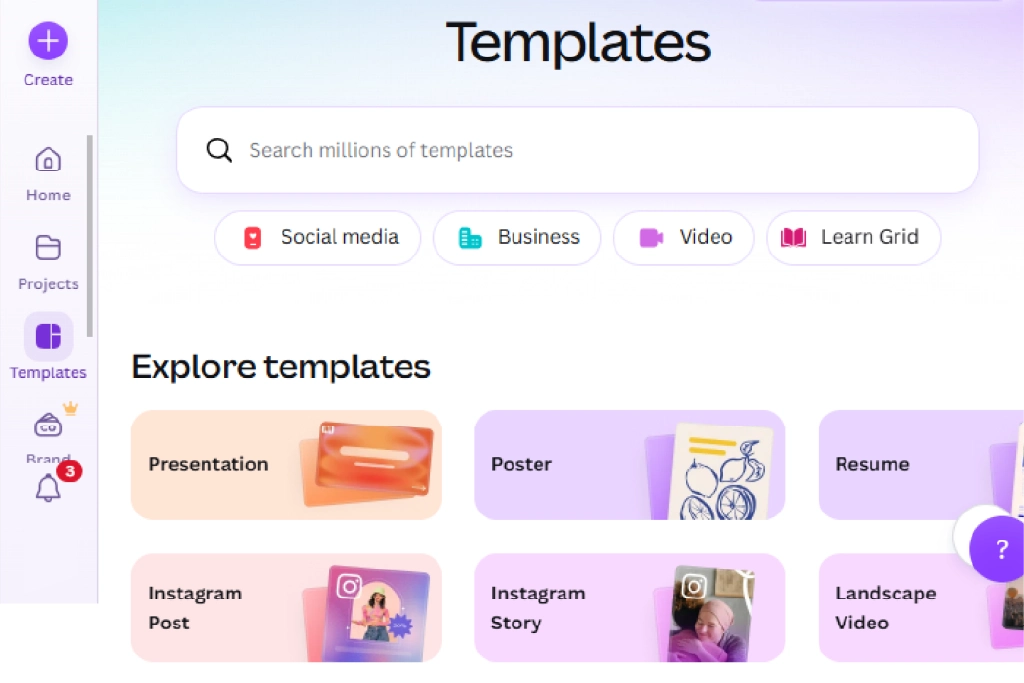
Canva is one of the most practical AI-powered tools for small business design. Many small businesses cannot hire a full-time designer, but they still need social media posts, flyers, banners, presentations, thumbnails, and basic brand visuals. Canva helps non-designers create polished materials using templates, brand kits, and AI-assisted creative features.
The best use case is fast marketing content. A bakery can create weekly offer posts. A clinic can design educational posts. An e-commerce store can prepare product banners. A service provider can design proposal covers, brochures, and ad creatives.
Canva is not a replacement for advanced professional design in every situation, but it is excellent for daily marketing needs. To keep your content original, do not rely only on default templates. Customize colors, layouts, copy, images, and brand elements.
- Best for: social media graphics, presentations, flyers, and brand visuals.
- Good for: businesses without an in-house designer.
- Check before use: brand kit setup, image licensing, export quality, and whether your final design looks unique.
5. Grammarly Business
Grammarly Business is helpful for improving writing quality across emails, proposals, support replies, reports, and website copy. Many small businesses lose trust because of unclear writing, spelling mistakes, or inconsistent tone. Grammarly can help teams write more clearly and professionally.
This is especially useful for sales and customer support teams. A support agent can write a polite reply faster. A salesperson can improve a follow-up email. A manager can make internal announcements easier to understand. Grammarly also helps maintain a consistent tone, which is important when multiple people communicate with customers.
As with any AI writing tool, the final message should still be checked by a human. The tool can improve clarity, but your team must decide whether the message is accurate, fair, and suitable for the customer situation.
- Best for: grammar, clarity, tone, and professional communication.
- Good for: emails, proposals, customer support, HR messages, and business documents.
- Check before use: privacy settings, team style guide, and approval workflow for sensitive messages.
6. Notion AI
Notion AI is useful for businesses that need one place for notes, standard operating procedures, meeting summaries, internal documentation, project plans, and team knowledge. Many small businesses keep important information scattered across WhatsApp, email, Google Docs, and personal notes. This creates confusion when the team grows.
With Notion, a business can create a simple knowledge base for tasks, policies, content calendars, website plans, client notes, and project updates. AI can help summarize pages, draft checklists, answer questions from stored information, and organize ideas.
This tool is most useful when your business commits to documenting information properly. AI cannot help much if your team does not keep notes, processes, and project data updated.
- Best for: internal knowledge, project notes, SOPs, and team organization.
- Good for: agencies, startups, content teams, and growing operations.
- Check before use: workspace structure, permissions, data organization, and team habits.
7. Zapier AI Automation
Zapier is helpful when your business uses many apps and wastes time moving information manually. It can connect tools such as forms, email, CRM, spreadsheets, project management apps, calendars, and marketing platforms. With AI features, automation can become more flexible than simple rule-based workflows.
For example, a new website lead can automatically be added to a CRM, assigned to a salesperson, summarized with AI, and followed up with an email draft. An e-commerce order can trigger internal notifications, customer tags, and marketing sequences. A support form can create a ticket and summarize the customer problem.
Automation should be planned carefully. Do not automate broken processes. First understand the workflow manually, then automate the repetitive steps. Also test every automation before using it with real customers.
- Best for: connecting apps and reducing repetitive manual work.
- Good for: businesses using multiple cloud tools.
- Check before use: app limits, workflow testing, error handling, and customer data privacy.

8. HubSpot Breeze
HubSpot Breeze is useful for businesses that want AI inside their CRM, marketing, sales, and service workflows. A CRM is valuable because it keeps customer information, leads, deals, emails, and follow-ups in one place. AI becomes more useful when it can work with that business context.
A small business can use HubSpot to organize leads, prepare follow-up emails, understand customer conversations, support marketing content, and improve service workflows. For a business that loses leads because of poor follow-up, a CRM with AI support can be more useful than a standalone chatbot.
This tool makes the most sense when your business is ready to manage leads properly. If your sales process is not clear, start by defining pipeline stages, lead sources, customer types, and follow-up rules.
- Best for: CRM, lead management, sales, marketing, and customer service.
- Good for: service businesses, agencies, consultants, and growing sales teams.
- Check before use: CRM setup quality, data cleanliness, team adoption, and subscription level.
9. QuickBooks / Intuit Assist
QuickBooks and Intuit Assist are useful for finance-related tasks, especially for businesses already using QuickBooks for accounting. AI support in accounting tools can help with transaction organization, financial insights, reminders, and everyday finance workflows.
Small businesses often struggle because financial information is updated late or spread across invoices, bank statements, spreadsheets, and messages. AI-powered accounting assistance can reduce manual work and help business owners understand numbers faster. However, financial decisions should always be reviewed carefully.
This type of tool is helpful, but it should not replace a qualified accountant or tax consultant. Use it to save time, organize data, and prepare better questions for your accountant.
- Best for: bookkeeping support, transaction organization, and finance workflows.
- Good for: businesses already using QuickBooks or Intuit products.
- Check before use: country availability, accounting rules, accountant access, and data accuracy.
10. Mailchimp AI Tools
Mailchimp is a strong option for email marketing and customer communication. Its AI tools can help small businesses create campaign ideas, improve personalization, analyze audience behavior, and support marketing automation.
Email marketing is still important because a business owns its email list more directly than social media followers. A small e-commerce store can send product updates, abandoned cart emails, seasonal offers, and customer education. A service business can send appointment reminders, newsletters, and follow-up campaigns.
To use Mailchimp properly, focus on permission-based marketing. Do not buy email lists or spam people. Build a real audience through website forms, checkout opt-ins, and useful lead magnets.
- Best for: email campaigns, SMS marketing, audience insights, and automation.
- Good for: e-commerce stores, local businesses, and service providers.
- Check before use: email consent, list quality, unsubscribe options, and campaign reporting.
11. Semrush AI and SEO Tools
Semrush is useful for businesses that want to grow organic traffic through SEO. AI can help with content planning, keyword ideas, competitor research, on-page improvements, and reporting. For a small business website, SEO is important because paid ads can become expensive over time.
A business can use SEO tools to find what customers are searching for, identify content gaps, track rankings, and improve website pages. AI can speed up research, but it should not create low-quality articles without human review. Search engines reward helpful content, not just keyword-stuffed pages.
This tool is best for businesses that are serious about publishing useful content regularly. If your website has only a few pages and no content strategy, start with basic keyword research and on-page SEO before paying for advanced tools.
- Best for: SEO research, content planning, website audits, and visibility tracking.
- Good for: blogs, service websites, e-commerce stores, and agencies.
- Check before use: your SEO goals, reporting needs, budget, and whether you can act on the data.

12. AI Chatbots for Website Support
AI chatbots are useful for answering common customer questions, collecting leads, and supporting visitors outside office hours. A chatbot can explain services, collect contact details, suggest resources, and route customers to the right team. For small businesses, this can improve response speed without hiring a large support team.
However, chatbots must be implemented responsibly. They should not pretend to be human, make false promises, provide unsafe advice, or handle sensitive issues without escalation. A good chatbot should clearly explain what it can do and offer a way to contact a real person.
Before adding a chatbot, prepare accurate FAQs, service details, pricing notes, refund policies, and escalation rules. The chatbot is only as useful as the information behind it.
- Best for: website support, lead collection, and common questions.
- Good for: local services, SaaS websites, clinics, agencies, and online stores.
- Check before use: accuracy, escalation to humans, privacy compliance, and conversation logs.
Suggested AI Tool Stack by Business Type
| Business Type | Suggested Tool Stack | Reason |
|---|---|---|
| Local service business | ChatGPT Business + Canva + Mailchimp or HubSpot | Covers customer replies, social content, email follow-up, and lead management. |
| E-commerce store | Canva + Mailchimp + ChatGPT + SEO tool | Supports product content, campaigns, visuals, and organic traffic. |
| Small agency | ChatGPT Business + Notion AI + Zapier + Canva | Helps with proposals, project notes, automation, and client content. |
| Consulting firm | Microsoft 365 Copilot or Google Gemini + Grammarly + CRM AI | Improves documents, emails, client follow-up, and internal communication. |
| Accounting or finance-heavy business | QuickBooks/Intuit Assist + ChatGPT + Microsoft 365 Copilot | Supports bookkeeping workflows, reporting, and client communication. |
The best setup is usually simple. Start with the software you already use, then add AI where it removes the most manual work. Do not subscribe to five new tools before your team knows how to use one properly.
Mistakes to Avoid When Using AI Tools
- Publishing AI content without editing it. AI can create a first draft, but your final article should include real examples, screenshots, original explanations, and updated facts.
- Sharing sensitive customer data with tools without checking privacy settings and business terms.
- Using AI to make unsupported claims, such as guaranteed sales, guaranteed rankings, or guaranteed income.
- Automating customer communication without human review for complaints, refunds, legal issues, medical topics, or financial matters.
- Buying too many subscriptions at once. Start small, measure time saved, and cancel tools that do not improve your workflow.
- Ignoring team training. Even the best AI tool fails if your team does not know how to prompt, review, and use it correctly.
- Using AI designs or templates without customizing them. Generic visuals can make your brand look copied and low-quality.
30-Day AI Implementation Plan for Small Businesses
| Timeline | Action | Expected Outcome |
|---|---|---|
| Days 1-3 | List repetitive tasks in writing, support, design, marketing, finance, and admin. | Clear understanding of where AI can help. |
| Days 4-7 | Choose one primary AI assistant and test it with real business tasks. | First proof of value without overspending. |
| Days 8-12 | Create prompt templates for emails, social posts, proposals, FAQs, and reports. | Faster, more consistent output for common tasks. |
| Days 13-18 | Add a design or marketing tool such as Canva or Mailchimp if needed. | Better visual content and customer communication. |
| Days 19-24 | Test automation for lead capture, follow-ups, reports, or task creation. | Reduced manual movement of information. |
| Days 25-30 | Review results, document SOPs, train the team, and decide which tools to keep. | A practical AI workflow that can continue after the test month. |
Final Recommendation
The best AI tools for small businesses in 2026 are not always the most expensive or the most advanced. The best tools are the ones that save time, improve quality, fit your existing workflow, and remain easy for your team to use. A small business should not adopt AI only because it is popular. It should adopt AI where there is a clear business need.
For most small businesses, the best starting stack is simple: one general AI assistant for writing and planning, one design tool for marketing visuals, one CRM or email tool for customer follow-up, and one automation tool when repetitive work becomes a problem. This approach keeps costs controlled and makes implementation easier.
Most importantly, AI should support human judgment. Use it to create drafts, summarize information, organize workflows, and save time, but review important outputs before publishing or sending them to customers. Businesses that use AI responsibly will get more value than businesses that only use it to produce more low-quality content.


